

Imagine your workspace as a garden—without proper tools and care, it can quickly become chaotic. In 2025, the right computer monitor stand can transform your setup, enhancing both comfort and productivity. With options that cater to various needs, you might wonder which stand will truly elevate your workspace. Let’s explore the top contenders that promise to bring order to your desk and improve your daily routine.
Amazon Basics Height Adjustable Computer Monitor Riser Desk Stand

The Amazon Basics Height Adjustable Computer Monitor Riser Desk Stand is perfect for anyone looking to enhance their workspace ergonomics. With adjustable heights of 2.87, 4.25, and 4.9 inches, you can reduce neck and eye strain effectively. It supports monitors, laptops, and printers up to 22 lbs, while its durable ABS plastic construction guarantees stability. The non-skid feet keep everything securely in place. Plus, the space underneath is ideal for organizing office supplies, helping you maintain a clutter-free desk. Easy to assemble and lightweight, this stand combines functionality with a sleek design, earning rave reviews from satisfied users.
Best For: Individuals seeking to improve their workstation ergonomics and organization while accommodating various devices.
Pros:
- Ergonomic design effectively reduces neck and eye strain with adjustable heights.
- Durable construction from ABS plastic ensures stability and longevity.
- Space-saving design with under-stand storage for office supplies promotes a clutter-free workspace.
Cons:
- Limited weight capacity of 22 lbs may not support larger monitors or equipment.
- Assembly required, which might not appeal to everyone.
- Adjustable heights may not fit all users’ preferences perfectly.
Simple Houseware Desk Dual Monitor Stand Riser with Drawer, Rustic Brown

Looking for an effective way to enhance your workspace? The Simple Houseware Desk Dual Monitor Stand Riser with Drawer in Rustic Brown is your answer. This multi-functional riser features three configuration modes—Compact, Full Extend, and Wide Angle—allowing you to customize your setup. Its sturdy design elevates your monitors to a comfortable height, helping reduce neck and eye strain. Plus, the built-in sliding drawer and side caddies provide extra storage for your stationery. With dimensions ranging from 33.3W x 10.9D x 5H to 45W x 10.9D x 5H, you’ll maximize desk space effortlessly. Upgrade your workspace today!
Best For: Individuals seeking to optimize their workspace ergonomics and storage with a stylish monitor stand.
Pros:
- Sturdy construction enhances durability and supports multiple devices.
- Adjustable configuration modes allow for personalized setup to suit different workspace needs.
- Integrated storage solutions keep stationery organized and easily accessible.
Cons:
- Limited color options may not fit all decor styles.
- Requires assembly, which may be inconvenient for some users.
- May occupy significant desk space in its fully extended configuration.
HUANUO Dual Monitor Stand – Fully Adjustable VESA Mount for 13 to 32 Inch Screens

For anyone seeking an efficient solution to enhance their workspace, the HUANUO Dual Monitor Stand stands out with its fully adjustable VESA mount, accommodating monitors from 13 to 32 inches. Its durable alloy steel construction supports monitors up to 19.8 lbs per arm, ensuring stability while you work. You can easily install it using either a C-clamp or grommet base, and the gas spring system offers smooth height adjustments. Plus, the built-in cable management channels help keep your desk tidy. With a 4.6-star rating and positive user feedback, it’s a fantastic choice for improving your workspace organization and comfort.
Best For: Those looking to optimize their workspace with adjustable dual monitor support for screens ranging from 13 to 32 inches.
Pros:
- Durable Construction: Made from robust alloy steel, providing stability for monitors up to 19.8 lbs per arm.
- Flexible Adjustability: Offers smooth height adjustments and the ability to tilt, swivel, and rotate monitors for ergonomic positioning.
- Easy Installation: Can be installed using a C-clamp or grommet base, with straightforward instructions for hassle-free setup.
Cons:
- Limited Quick-Release Options: Lacks a quick-release feature for easy monitor swapping.
- Vertical Adjustment Challenges: Some users report difficulties with vertical adjustments to achieve desired monitor heights.
- Compatibility Considerations: Best suited for monitors up to 27 inches; larger monitors may affect stability and performance.
EVOOMI Back Saver Monitor Stand for Desk (2 Pack)
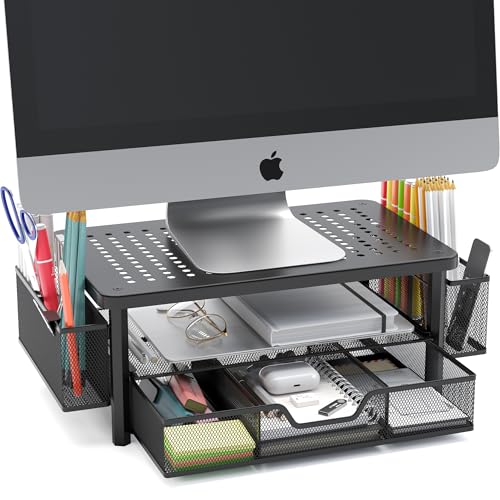
eVoomi FlowMax Ergonomic Desk organizer Computer Monitor Stand -Improved XL Desk Drawer, File Paper Pencil Holders - Pro Posture Eye-Level Tension Relief - Anti-Slip Home Office Supplies Storage Stand for Laptop Monitor or Printer
Elevate your workspace with the EVOOMI Back Saver Monitor Stand, a perfect choice for anyone seeking improved ergonomics and productivity. This 2-pack stand is designed to keep your monitor at eye level, promoting proper posture and ideal circulation. With a heavy-duty, wobble-free steel frame and a capacity of 44 pounds, it’s built for stability. The integrated small drawers help you stay organized, potentially boosting your productivity by 223 hours annually. Plus, its CoolMesh technology prevents overheating, ensuring your electronics last longer. Rated 4.7 out of 5 stars, the EVOOMI stand combines functionality and sleek design for any office environment.
Best For: Individuals seeking to enhance their workspace ergonomics and productivity through a stable and organized monitor stand.
Pros:
- Ergonomically designed to promote proper posture and circulation while working.
- Heavy-duty construction supports up to 44 pounds, ensuring stability and durability.
- Integrated storage drawers help keep your workspace organized and efficient.
Cons:
- Limited height adjustability may not suit all user preferences.
- Plastic drawers might not be as durable as metal alternatives.
- Not suitable for larger monitors exceeding the weight capacity.
VIVO Dual Monitor Desk Mount (STAND-V002)

The VIVO Dual Monitor Desk Mount (STAND-V002) stands out as an ideal choice for anyone needing a versatile solution for dual-screen setups. It accommodates screens ranging from 13” to 30” and supports up to 22 lbs each, ensuring compatibility with most monitors. You’ll appreciate the impressive articulation, allowing for +90° to -90° tilt, 180° swivel, and 360° rotation. Installation is a breeze with detachable VESA brackets and a sturdy C-clamp mount. Plus, the included cable management clips keep your workspace tidy. With a solid 4.5-star rating and a 3-year warranty, you can trust its durability and performance.
Best For: Those seeking a sturdy and versatile dual monitor mount that offers extensive adjustability for improved workspace ergonomics.
Pros:
- Sturdy construction that securely holds monitors up to 22 lbs each.
- Easy installation with detachable VESA brackets and included hardware.
- Effective cable management with clips to keep your workspace organized.
Cons:
- Tilt joint design may struggle with heavier monitors, affecting stability.
- Some users report difficulty with tilt adjustments when securing heavier displays.
- Limited to screens sized between 13” and 30”, which may not fit larger monitors.
Single LCD Computer Monitor Desk Stand Mount (HT05B-001)

If you’re seeking a sturdy and stylish solution for your workspace, the Single LCD Computer Monitor Desk Stand Mount (HT05B-001) is an excellent choice. It fits screens from 13 to 32 inches and holds up to 77 lbs, ensuring your monitor stays secure. With ergonomic features, it elevates your display for a better viewing angle, promoting good posture. You can easily tilt, swivel, or rotate your monitor for ideal positioning. Assembly is quick, taking about 15 minutes, and it comes with all necessary tools. Users rave about its durability and design, making it a top pick in monitor stands.
Best For: Those looking for a stylish and ergonomic monitor stand that accommodates a range of screen sizes from 13 to 32 inches.
Pros:
- Sturdy construction supports up to 77 lbs, providing security for your monitor.
- Ergonomic design promotes better posture with adjustable viewing angles.
- Quick and easy assembly, typically completed in about 15 minutes.
Cons:
- Some users report minor difficulties during assembly.
- Height adjustments may be challenging after initial setup.
- Packaging quality upon delivery has received mixed reviews.
HUANUO Dual Monitor Arm for Ultrawide Screens

For those seeking an efficient solution to manage dual ultrawide screens, the HUANUO Dual Monitor Arm stands out with its remarkable compatibility, supporting monitors up to 49 inches stacked or 40 inches side-by-side. Constructed from high-strength aluminum alloy, it holds up to 40 lbs with ease. The 19.5” pole allows for a height adjustment of up to 29.1”, optimizing your viewing angle. With arms extending 25”, you can enjoy a full range of motion, including tilt and swivel. Quick installation and user-friendly tension adjustments make setup a breeze, freeing up desk space and enhancing your workspace ergonomics.
Best For: This product is best for professionals and gamers who require efficient dual ultrawide screen setups for enhanced productivity and immersive experiences.
Pros:
- Sturdy construction made from high-strength aluminum alloy, providing durability and stability.
- Flexible adjustments with a wide range of motion, allowing for optimal viewing angles and ergonomic positioning.
- Space-saving design that frees up desk space, improving organization and reducing clutter.
Cons:
- Some users suggested the adjustment key could be shorter for easier handling.
- Limited cable management options might require additional solutions for a tidy workspace.
- The weight capacity may not accommodate heavier monitors beyond 40 lbs, limiting compatibility.
Factors to Consider When Choosing Computer Monitor Stands
When choosing a computer monitor stand, you’ll want to think about height adjustability and weight capacity to guarantee it meets your needs. Consider the ergonomic design features to enhance your comfort during long hours of work. Finally, look for space-saving solutions and durable materials that can withstand daily use.
Height Adjustability Options
How can height adjustability impact your daily comfort and productivity? An adjustable monitor stand can greatly reduce neck and eye strain by positioning your screen at eye level. This promotes better posture, which is essential for long hours at your desk. Many stands offer multiple height settings, like 2.87 inches, 4.25 inches, and 4.9 inches, allowing you to customize your setup based on your preferences. Some models even use stackable legs or poles for quick adjustments. Plus, these stands can accommodate various devices, from monitors to laptops, typically supporting weights between 22 lbs and 40 lbs. With an ergonomic design, height-adjustable stands can enhance your comfort and boost your productivity throughout the day.
Weight Capacity Considerations
Choosing the right weight capacity for your computer monitor stand is essential to confirm stability and safety. Monitor stands typically support weights ranging from 10 lbs to 77 lbs, so you need to ascertain the stand can handle your monitor’s weight. Check the specifications for both single and dual monitor setups, as many stands indicate maximum weight limits per arm. For dual setups, common capacities are around 19.8 lbs per arm for ideal stability. Don’t forget to factor in any additional devices or accessories on the stand, as exceeding the weight limit can lead to tipping or damage. Regularly verify the weight distribution to maintain balance and avoid potential hazards over time.
Ergonomic Design Features
To guarantee a comfortable and efficient workspace, ergonomic design features in computer monitor stands are essential. These stands elevate your monitor to eye level, considerably reducing neck and eye strain. Adjustable height settings let you customize the position, ensuring you maintain proper posture and minimize discomfort during long hours of use. Many ergonomic stands also include non-skid feet for added stability, keeping your monitor securely in place as you type or navigate your desk. Additionally, a well-designed monitor stand provides extra storage underneath, helping you maintain an organized workspace that boosts productivity. By choosing robust materials, these stands support monitors and laptops, ensuring stability and longevity without wobbling, giving you peace of mind while you work.
Space-Saving Solutions
When selecting a computer monitor stand, consider how space-saving solutions can enhance your workspace. Elevating your screen to eye level not only promotes better posture but also opens up valuable desk space underneath for organizing office supplies, creating a clutter-free environment. Look for monitor risers that include additional storage options, like drawers or compartments, to keep essential items within easy reach. Adjustable stands accommodate various screen sizes, providing flexibility and ergonomic benefits. If you use multiple devices, dual monitor stands can greatly free up desk space by allowing side-by-side or stacked setups. Finally, don’t overlook cable management features, as they help organize wires and cords, contributing to a neat, efficient workspace.
Durability and Material Quality
A well-organized workspace not only benefits from space-saving solutions but also relies heavily on the durability and material quality of your computer monitor stand. When choosing a stand, consider materials like alloy steel or high-strength aluminum alloy, as they provide enhanced stability and can support heavier monitors, often up to 40 lbs or more. Lightweight ABS plastic stands are great for easy mobility while still ensuring longevity. Look for heavy-duty designs with anti-skid rubber feet, which minimize wobbling and distractions. Reinforced structures with thicker arms and lock rings improve stability, especially for multi-monitor setups. Finally, opt for stands that meet rigorous testing standards, as those passing 50,000 cycle motion tests show high durability and reliability over time.
Installation and Assembly Ease
Choosing the right monitor stand involves considering installation and assembly ease, which can greatly impact your overall experience. Look for products that provide clear instructions and all necessary hardware, making setup a breeze. Some stands feature tool-free installation methods, like C-clamp or grommet mounts, saving you time and the hassle of drilling. Detachable VESA bracket plates can simplify mounting and dismounting your monitor, too. Make certain the stand has adjustable components that are easy to customize, often using an Allen key for tension. Finally, consider stands with minimal assembly, such as pre-assembled designs or those with user-friendly, labeled parts, to guarantee you can quickly get back to work without frustration.
Cable Management Solutions
Clutter-free workspaces enhance productivity, and effective cable management solutions play an essential role in achieving that. When choosing monitor stands, look for options with built-in cable management clips or channels that keep cords organized and out of sight. These features not only improve aesthetics but also make your workspace more functional. You can further enhance cable organization by using cable ties or sleeves to prevent tangling. If you opt for adjustable monitor arms, consider those with integrated cable management systems, allowing for flexibility without hindering monitor movement. A well-managed cable system contributes to a safer work environment, minimizing tripping hazards and ensuring easy access to ports and connections. Keep your workspace tidy and efficient with the right cable management solutions.